Je vous partage ici mon expérience avec Fastfetch, l’outil que j’utilise au quotidien pour afficher les informations système de mes machines. C’est, selon moi, la meilleure alternative à Neofetch pour allier rapidité et design.
¶ Installation de l’outil
Pour commencer, je vous explique comment l’installer sur vos systèmes basés sur Debian ou Ubuntu.
- Sur Debian (Trixie/Sid) et Ubuntu (24.04+) :
sudo apt update && sudo apt install fastfetch
- Via PPA pour les versions plus anciennes :
sudo add-apt-repository ppa:zhangsongcui3371/fastfetch
sudo apt update && sudo apt install fastfetch
¶ Gestion de ma configuration
Je centralise toutes mes modifications dans un seul fichier. Voici comment je procède pour appliquer mes réglages.
¶ Créer le fichier de base
Si vous voulez voir toutes les options disponibles, je vous conseille de générer le fichier par défaut :
fastfetch --gen-config
Le fichier se trouvera dans votre dossier personnel : ~/.config/fastfetch/config.jsonc.
Sinon : fastfetch --gen-config .config/fastfetch/config.jsonc.
¶ Utiliser mes réglages personnalisés
- Je m’assure que le dossier existe :
mkdir -p ~/.config/fastfetch - J’édite le fichier avec mon éditeur favori :
nano ~/.config/fastfetch/config.jsonc - Je remplace tout le contenu par l’un de mes modèles ci-dessous.
¶ 🎨 Aller plus loin : Les Nerd Fonts (Icônes HD)
Si vous voulez remplacer les émojis classiques par des icônes haute définition (logos de distribs, processeurs, etc.), vous devez installer une Nerd Font.
¶ 1. Installation rapide (Script)
Voici une commande pour installer la police Hack Nerd Font (très lisible) sur votre système :
mkdir -p ~/.local/share/fonts && cd ~/.local/share/fonts
wget https://github.com/ryanoasis/nerd-fonts/releases/latest/download/Hack.zip
unzip Hack.zip && rm Hack.zip && fc-cache -fv
¶ 2. L’astuce pour un rendu parfait
Inutile de forcer la police dans les réglages de votre terminal ! Dans les préférences de votre terminal (comme GNOME Terminal), décochez « Police personnalisée ». Le système utilisera sa police par défaut pour le texte et piochera automatiquement dans la Nerd Font fraîchement installée pour afficher les icônes.
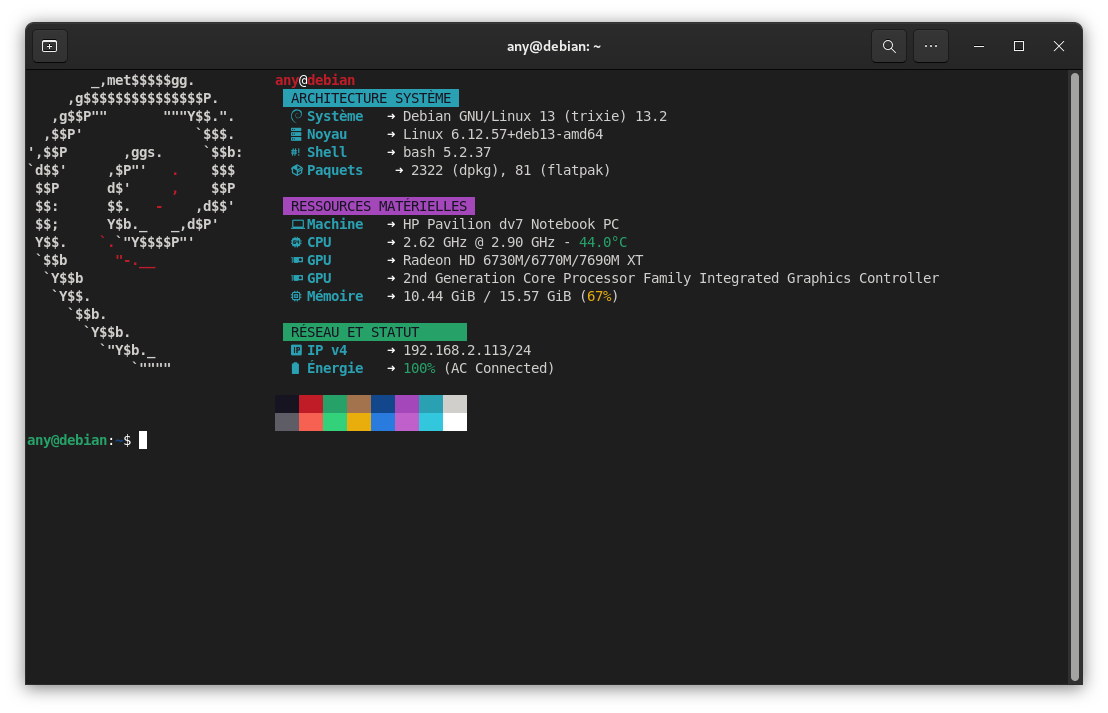
💡 Voici le résultat du rendu avec les Nerd Fonts sur mon terminal :
¶ ⚙️ Personnaliser votre fichier config.jsonc
Le fichier est structuré en JSONC (JSON avec commentaires). Voici comment adapter les modèles à votre machine :
¶ 🖼️ Changer le logo
Par défaut, Fastfetch détecte votre distribution. Mais vous pouvez forcer un logo spécifique (comme le debian_small que j’affectionne) ou même une image. Cela se place avant la section des modules :
    "logo": {
        "source": "debian_small", // Options : debian_small, ubuntu_small, arch_small, etc.
        "padding": {
            "top": 1,
            "left": 2
        }
    },
¶ 🧩 Les Modules
Chaque bloc { "type": "..." } est un module.
- Key : C’est l’étiquette à gauche (ex:
"key": " CPU"). - Format : Permet de choisir quelles données afficher.
- Temp : Ajoutez
"temp": truepour afficher la température. - Le Host : Par défaut, il affiche le nom du modèle détecté par le système.
¶ 📄 Exemple d’un fichier complet personnalisé
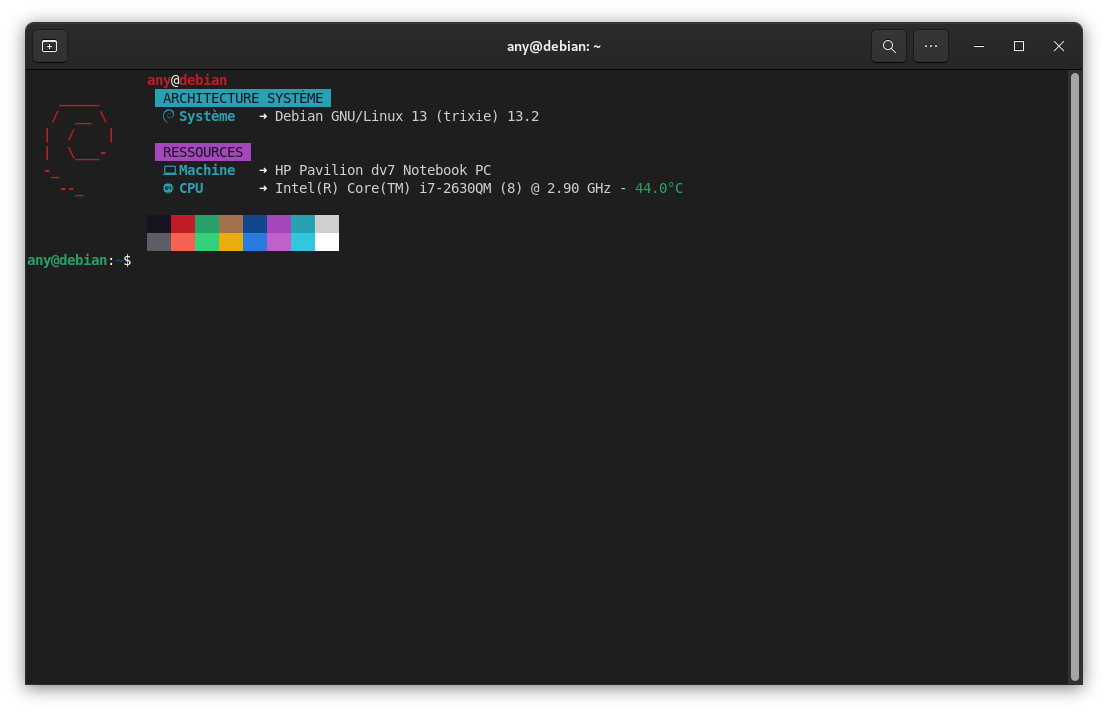
Voici à quoi ressemble la structure globale d’un fichier config.jsonc intégrant un logo spécifique et le style Néon :
Voir le code complet (Exemple Logo + Néon)
// # Modifications apportées par Blabla Linux
{
"$schema": "https://github.com/fastfetch-cli/fastfetch/raw/dev/doc/json_schema.json",
"logo": {
"source": "debian_small",
"padding": { "top": 1, "left": 2 }
},
"display": { "separator": " ➜ ", "color": { "keys": "cyan", "output": "white" } },
"modules": [
"title",
{ "type": "custom", "format": " \u001b[46m\u001b[30m ARCHITECTURE SYSTÈME \u001b[0m", "key": " " },
{ "type": "os", "key": " Système ", "format": "{3} {8}" },
"break",
{ "type": "custom", "format": " \u001b[45m\u001b[30m RESSOURCES \u001b[0m", "key": " " },
{ "type": "host", "key": " Machine " },
{ "type": "cpu", "key": " CPU ", "temp": true },
"break", "colors"
]
}
¶ Mes modèles de configuration
¶ 1. Style classique et épuré
C’est le modèle le plus complet en termes de données brutes. Je l’utilise quand j’ai besoin d’un rapport détaillé sans fioritures.
Voir le code (Classique)
// # Modifications apportées par Blabla Linux : https://link.blablalinux.be
{
    "$schema": "https://github.com/fastfetch-cli/fastfetch/raw/dev/doc/json_schema.json",
    "display": { "separator": " ➜  " },
    "modules": [
        "title", "separator",
        { "type": "os", "key": "Système     " },
        { "type": "host", "key": "Machine     " },
        { "type": "kernel", "key": "Noyau       " },
        { "type": "uptime", "key": "Activité    " },
        { "type": "packages", "key": "Paquets     " },
        { "type": "shell", "key": "Shell       " },
        { "type": "display", "key": "Écran       " },
        { "type": "de", "key": "Bureau      " },
        { "type": "terminal", "key": "Terminal    " },
        { "type": "cpu", "key": "Processeur  ", "temp": true },
        { "type": "gpu", "key": "Graphique   ", "hideType": "all", "format": "{1} {2}" },
        { "type": "memory", "key": "Mémoire     " },
        { "type": "swap", "key": "Swap        " },
        { "type": "disk", "key": "Disque      " },
        { "type": "localip", "key": "IP locale   ", "showIpv6": false },
        "break",
        { "type": "battery", "key": "Batterie    " },
        { "type": "poweradapter", "key": "Secteur     " },
        "colors"
    ]
}

¶ 2. Style moderne avec émojis
Parfait pour une identification visuelle instantanée des composants.
Voir le code (Émojis)
// # Modifications apportées par Blabla Linux : https://link.blablalinux.be
{
    "$schema": "https://github.com/fastfetch-cli/fastfetch/raw/dev/doc/json_schema.json",
    "display": { "separator": " ➜  " },
    "modules": [
        "title", "separator",
        { "type": "os", "key": "🐧 Système     " },
        { "type": "host", "key": "💻 Machine     " },
        { "type": "kernel", "key": "⚙️  Noyau       " },
        { "type": "uptime", "key": "⏱️  Activité    " },
        { "type": "packages", "key": "📦 Paquets     " },
        { "type": "shell", "key": "🐚 Shell       " },
        { "type": "cpu", "key": "🧠 Processeur  ", "temp": true },
        { "type": "gpu", "key": "🎮 Graphique   ", "hideType": "all", "format": "{1} {2}" },
        { "type": "memory", "key": "💾 Mémoire     " },
        { "type": "disk", "key": "💽 Disque      " },
        { "type": "localip", "key": "🌐 IP locale   ", "showIpv6": false },
        "break",
        { "type": "battery", "key": "🔋 Batterie    " },
        { "type": "poweradapter", "key": "🔌 Power       " },
        "colors"
    ]
}

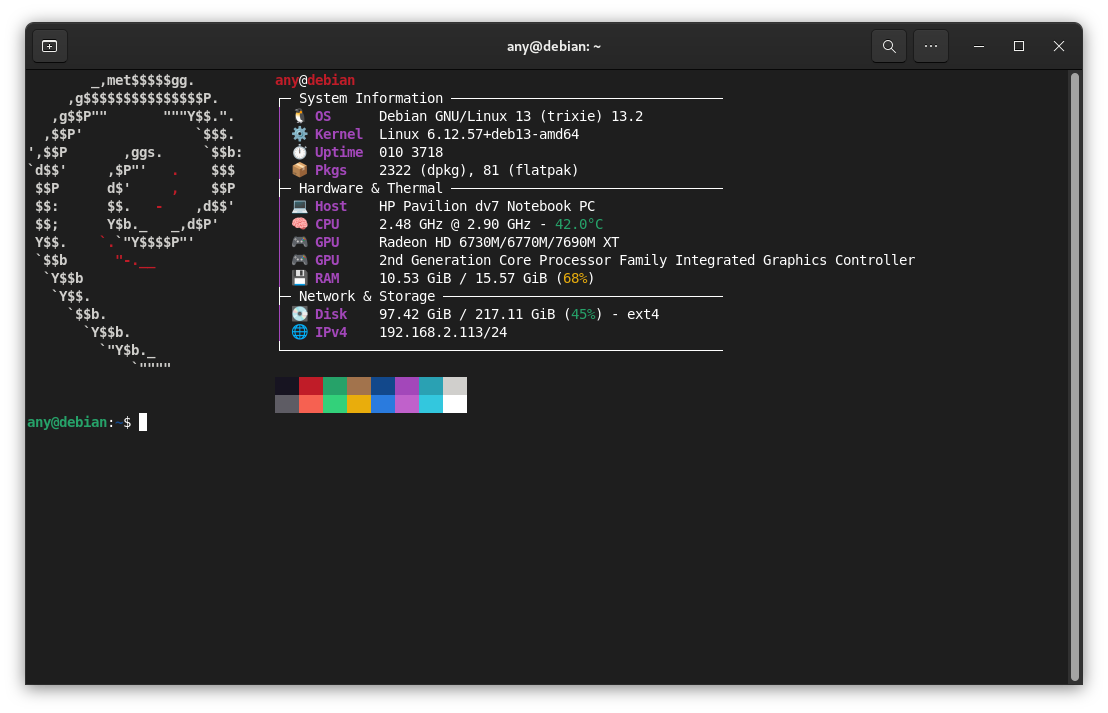
¶ 3. Style tableau de bord (Dashboard)
Ce modèle organise l’information par catégories.
Voir le code (Tableau de bord)
// # Modifications apportées par Blabla Linux : https://link.blablalinux.be
{
    "$schema": "https://github.com/fastfetch-cli/fastfetch/raw/dev/doc/json_schema.json",
    "display": { "separator": " ", "color": { "keys": "magenta" } },
    "modules": [
        "title",
        { "type": "custom", "format": "┌─ Informations système ────────────────────────────────" },
        { "type": "os", "key": "│ 🐧 Système  ", "format": "{3} {8}" },
        { "type": "kernel", "key": "│ ⚙️  Noyau     ", "format": "{1} {2}" },
        { "type": "uptime", "key": "│ ⏱️  Activité ", "format": "{1}{2} {3}{4}" },
        { "type": "custom", "format": "├─ Matériel et température ─────────────────────────────" },
        { "type": "host", "key": "│ 💻 Machine  " },
        { "type": "cpu", "key": "│ 🧠 CPU      ", "temp": true, "format": "{6} @ {7} - {8}" },
        { "type": "gpu", "key": "│ 🎮 GPU      ", "hideType": "all", "format": "{2}" },
        { "type": "memory", "key": "│ 💾 Mémoire  " },
        { "type": "custom", "format": "├─ Stockage et réseau ──────────────────────────────────" },
        { "type": "disk", "key": "│ 💽 Disque   ", "folders": "/" },
        { "type": "localip", "key": "│ 🌐 IP v4     ", "showIpv6": false },
        { "type": "custom", "format": "└───────────────────────────────────────────────────────" },
        "break", "colors"
    ]
}
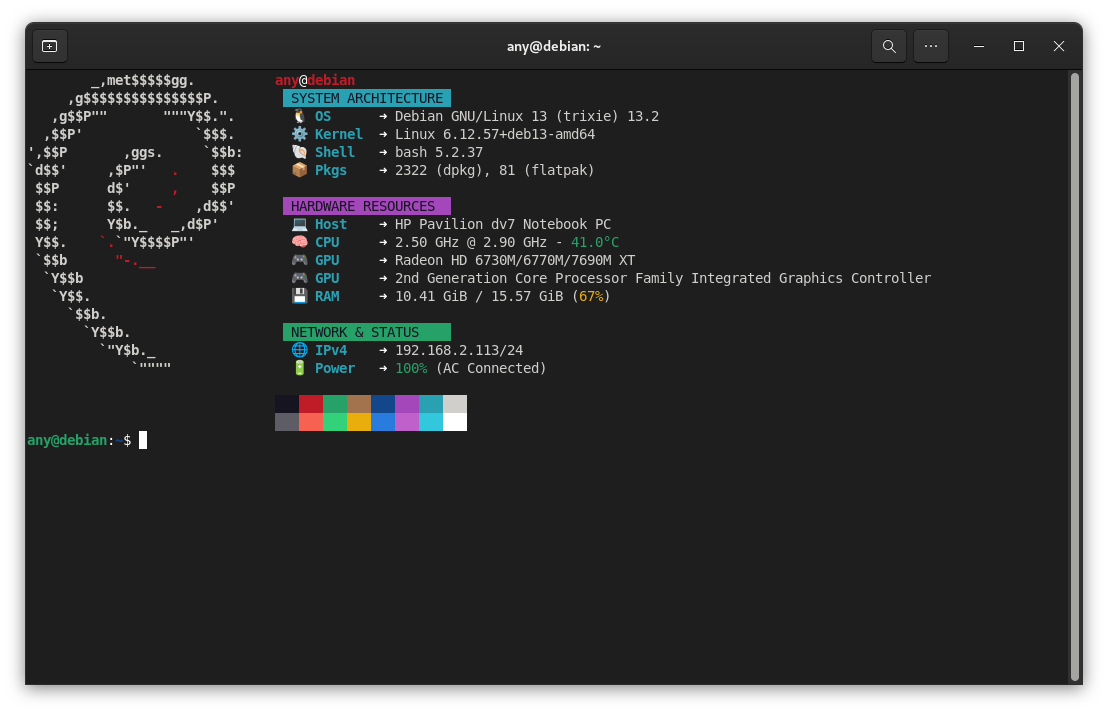
¶ 4. Style Néon Cyberpunk
Ma création favorite avec des bannières de couleurs ANSI.
¶ Option A : Version Émojis (Universelle)
Voir le code (Néon Émojis)
// # Modifications apportées par Blabla Linux : https://link.blablalinux.be
{
    "$schema": "https://github.com/fastfetch-cli/fastfetch/raw/dev/doc/json_schema.json",
    "display": { "separator": " ➜ ", "color": { "keys": "cyan", "output": "white" } },
    "modules": [
        "title",
        { "type": "custom", "format": " \u001b[46m\u001b[30m ARCHITECTURE SYSTÈME \u001b[0m", "key": " " },
        { "type": "os", "key": "  🐧 Système  ", "format": "{3} {8}" },
        { "type": "kernel", "key": "  ⚙️  Noyau     ", "format": "{1} {2}" },
        { "type": "shell", "key": "  🐚 Shell     " },
        { "type": "packages", "key": "  📦 Paquets   " },
        "break",
        { "type": "custom", "format": " \u001b[45m\u001b[30m RESSOURCES MATÉRIELLES \u001b[0m", "key": " " },
        { "type": "host", "key": "  💻 Machine  " },
        { "type": "cpu", "key": "  🧠 CPU       ", "temp": true, "format": "{6} @ {7} - {8}" },
        { "type": "gpu", "key": "  🎮 GPU       ", "hideType": "all", "format": "{2}" },
        { "type": "memory", "key": "  💾 Mémoire  ", "format": "{1} / {2} ({3})" },
        "break",
        { "type": "custom", "format": " \u001b[42m\u001b[30m RÉSEAU ET STATUT       \u001b[0m", "key": " " },
        { "type": "localip", "key": "  🌐 IP v4     ", "showIpv6": false },
        { "type": "battery", "key": "  🔋 Énergie  ", "format": "{4} ({5})" },
        "break", "colors"
    ]
}
¶ Option B : Version Nerd Fonts (Icônes HD)
Voir le code (Néon Nerd Fonts)
// # Modifications apportées par Blabla Linux : https://link.blablalinux.be
{
"$schema": "https://github.com/fastfetch-cli/fastfetch/raw/dev/doc/json_schema.json",
"display": { "separator": " ➜ ", "color": { "keys": "cyan", "output": "white" } },
"modules": [
"title",
{ "type": "custom", "format": " \u001b[46m\u001b[30m ARCHITECTURE SYSTÈME \u001b[0m", "key": " " },
{ "type": "os", "key": " Système ", "format": "{3} {8}" },
{ "type": "kernel", "key": " Noyau ", "format": "{1} {2}" },
{ "type": "shell", "key": " Shell " },
{ "type": "packages", "key": " Paquets " },
"break",
{ "type": "custom", "format": " \u001b[45m\u001b[30m RESSOURCES MATÉRIELLES \u001b[0m", "key": " " },
{ "type": "host", "key": " Machine " },
{ "type": "cpu", "key": " CPU ", "temp": true, "format": "{6} @ {7} - {8}" },
{ "type": "gpu", "key": " GPU ", "hideType": "all", "format": "{2}" },
{ "type": "memory", "key": " Mémoire ", "format": "{1} / {2} ({3})" },
"break",
{ "type": "custom", "format": " \u001b[42m\u001b[30m RÉSEAU ET STATUT \u001b[0m", "key": " " },
{ "type": "localip", "key": " IP v4 ", "showIpv6": false },
{ "type": "battery", "key": " Énergie ", "format": "{4} ({5})" },
"break", "colors"
]
}
¶ 5. Style « The Thin Line » (Minimaliste)
Une configuration ultra-fine qui prend très peu de place en largeur, parfaite pour les terminaux divisés (split screen).
Voir le code (Minimaliste)
// # Modèle "The Thin Line" par Blabla Linux
{
    "$schema": "https://github.com/fastfetch-cli/fastfetch/raw/dev/doc/json_schema.json",
    "logo": {
        "source": "debian_small",
        "padding": { "top": 1, "left": 2 },
        "color": { "1": "white" }
    },
    "display": {
        "separator": " ",
        "color": { "keys": "magenta" }
    },
    "modules": [
        { "type": "title", "format": "{1}@{2}" },
        { "type": "custom", "format": " \u001b[90m│\u001b[0m" },
        { "type": "os", "key": " \u001b[90m│\u001b[0m 🐧" },
        { "type": "kernel", "key": " \u001b[90m│\u001b[0m ⚙️ " },
        { "type": "uptime", "key": " \u001b[90m│\u001b[0m ⏱️ " },
        { "type": "cpu", "key": " \u001b[90m│\u001b[0m 🧠", "temp": true },
        { "type": "memory", "key": " \u001b[90m│\u001b[0m 💾" },
        { "type": "localip", "key": " \u001b[90m│\u001b[0m 🌐", "showIpv6": false },
        { "type": "custom", "format": " \u001b[90m╰───────\u001b[0m" }
    ]
}

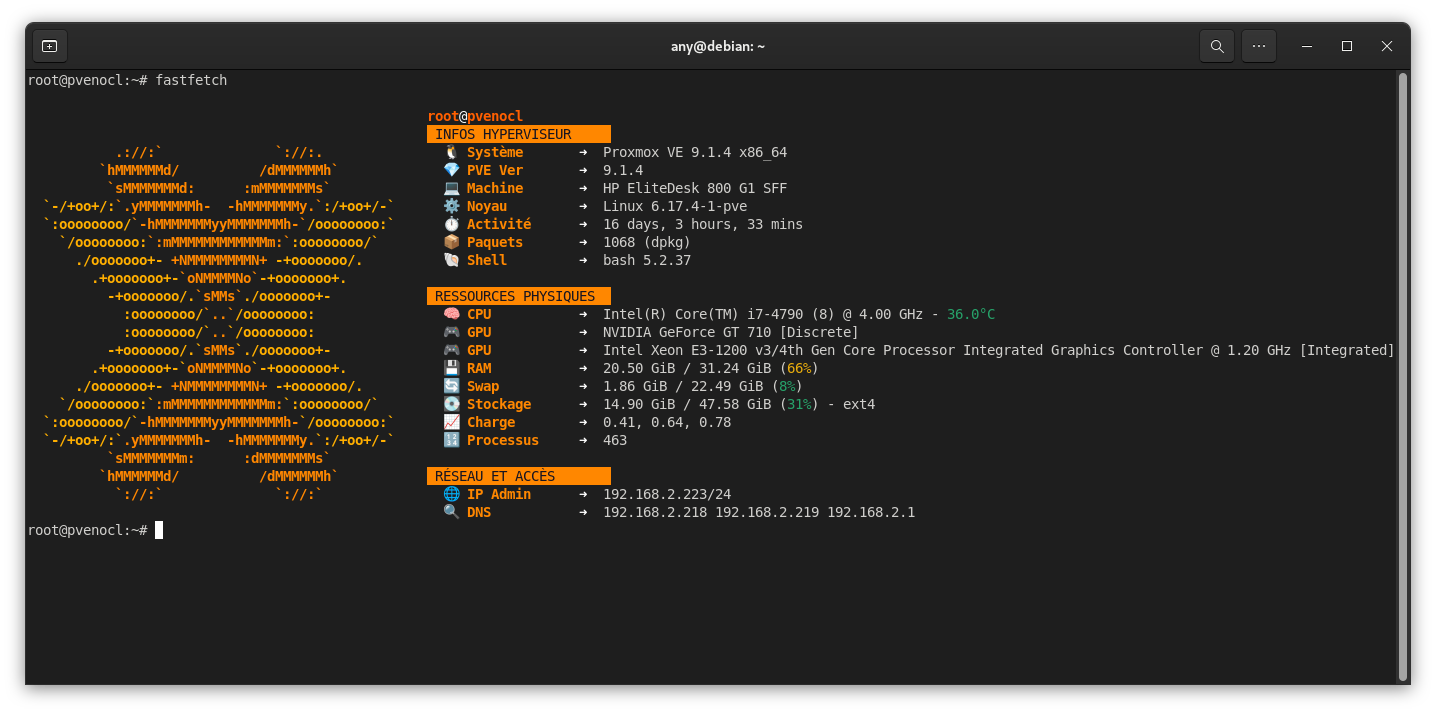
¶ 🎁 Bonus : Le modèle Spécial Proxmox
Pour les utilisateurs de Proxmox, j’ai préparé une configuration qui affiche les infos vitales de l’hyperviseur avec le logo ASCII orange officiel.
Voir le code Proxmox (Pixel-Perfect)
// # Configuration Proxmox (Pixel-Perfect) - Blabla Linux
{
    "$schema": "https://github.com/fastfetch-cli/fastfetch/raw/dev/doc/json_schema.json",
    "logo": {
        "source": "proxmox",
        "color": { "1": "38;5;208", "2": "38;5;214" },
        "padding": { "top": 2, "left": 2 }
    },
    "display": {
        "separator": " ➜  ",
        "color": { "keys": "38;5;208", "output": "white" }
    },
    "modules": [
        "title",
        { "type": "custom", "format": "\u001b[48;5;208m\u001b[30m INFOS HYPERVISEUR     \u001b[0m" },
        { "type": "os", "key": "  🐧 Système      " },
        { "type": "command", "key": "  💎 PVE Ver      ", "shell": "bash", "text": "pveversion | cut -d'/' -f2" },
        { "type": "host", "key": "  💻 Machine      " },
        { "type": "kernel", "key": "  ⚙️  Noyau        " },
        { "type": "uptime", "key": "  ⏱️  Activité     " },
        { "type": "packages", "key": "  📦 Paquets      " },
        { "type": "shell", "key": "  🐚 Shell        " },
        "break",
        { "type": "custom", "format": "\u001b[48;5;208m\u001b[30m RESSOURCES PHYSIQUES  \u001b[0m" },
        { "type": "cpu", "key": "  🧠 CPU          ", "temp": true },
        { "type": "gpu", "key": "  🎮 GPU          " },
        { "type": "memory", "key": "  💾 RAM          " },
        { "type": "swap", "key": "  🔄 Swap         " },
        { "type": "disk", "key": "  💽 Stockage     ", "folders": "/" },
        { "type": "loadavg", "key": "  📈 Charge       " },
        { "type": "processes", "key": "  🔢 Processus    " },
        "break",
        { "type": "custom", "format": "\u001b[48;5;208m\u001b[30m RÉSEAU ET ACCÈS       \u001b[0m" },
        { "type": "localip", "key": "  🌐 IP Admin     ", "showIpv6": false },
        { "type": "dns", "key": "  🔍 DNS          " },
        { "type": "publicip", "key": "  🌍 IP Publique  " }
    ]
}
☝️ Je vous invite à retrouver ces différents fichiers de configuration Fastfetch sur mon instance ByteStash ✔️
☝️ Vous trouverez d’autres exemples de fichiers
config.jsoncpour Fastfetch sur la page du projet GitHub : https://github.com/fastfetch-cli/fastfetch/tree/dev/presets/examples
¶ 🚀 Et ce n’est que le début !
La personnalisation d’un terminal n’est jamais vraiment terminée… Je continuerai à créer et à peaufiner de nouveaux modèles Fastfetch au fil de mes découvertes et de mes besoins sur différentes machines.
Plutôt que de surcharger cette page, j’ai décidé de centraliser tous mes futurs fichiers .jsonc (les nouveaux styles, les variantes et les mises à jour) directement sur mon instance Nextcloud. Vous y trouverez une collection grandissante pour donner un look unique à vos systèmes :